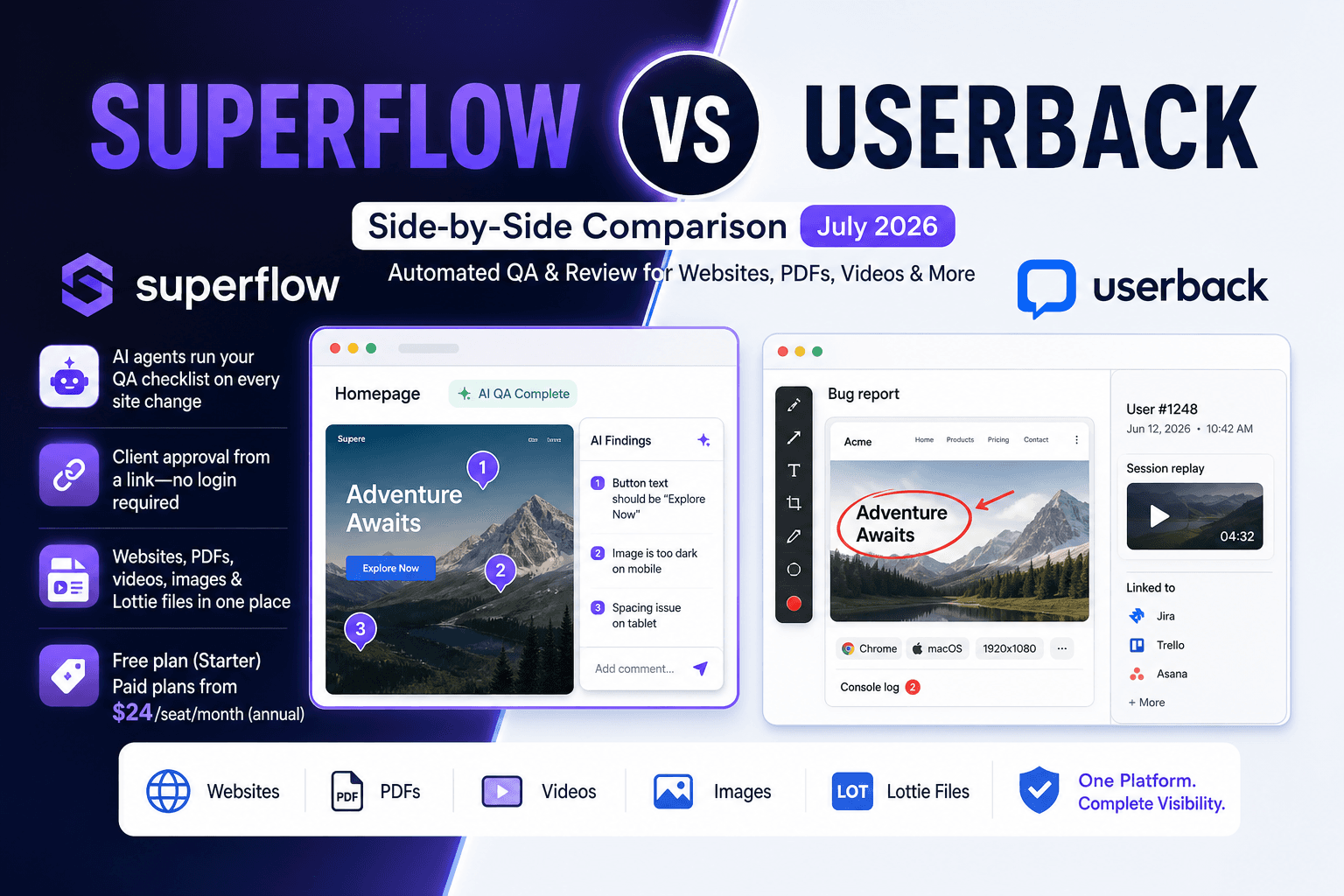
If you're weighing Superflow vs Userback, the short version is that they're aimed at different workflows. Userback is a solid pick for internal dev and QA teams managing bug reports. Superflow is an AI-powered QA and review/approval tool built for agencies: AI agents run your QA checklist automatically on eSuperfvery site change, leave findings as pinned comments, and your client signs off from a link with no login required. The rest of this breaks down exactly where they differ so you can make the call quickly.
TLDR:
- Userback targets QA and dev teams; Superflow is an AI-powered QA and review/approval tool built for agencies delivering client work
- Superflow's AI agents run your QA checklist on every site change, posting findings as pinned comments so no manual first pass is needed
- Clients approve directly from a link with no account or login required, cutting sign-off delays at the source
- Superflow has a free plan (Starter); paid plans start at $24/seat/month (annual). Userback starts at $29/month but feature access scales steeply with price
- Superflow supports websites, PDFs, video, images, and Lottie files in one project, plus white-label client portals on Scale and above
What Is Userback?
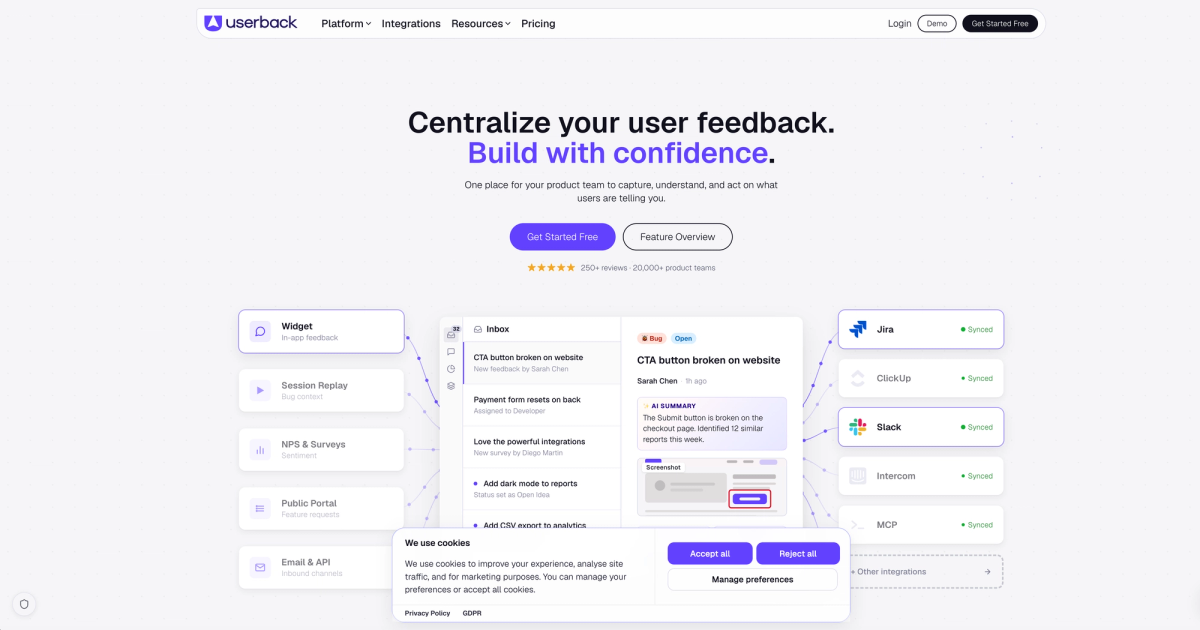
Userback is a feedback and bug reporting tool built for software teams. It lets users submit annotated screenshots, video recordings, and session replays directly from a live website or app, with each piece of feedback automatically tagged with browser, OS, and device metadata.
The tool connects with project management apps like Jira, Trello, and Asana, so reported bugs flow straight into a team's existing workflow. It also includes a user portal where clients or end users can track the status of their submitted feedback.
Userback targets QA teams, product managers, and developers who need structured bug capture during testing cycles.
What Is Superflow?
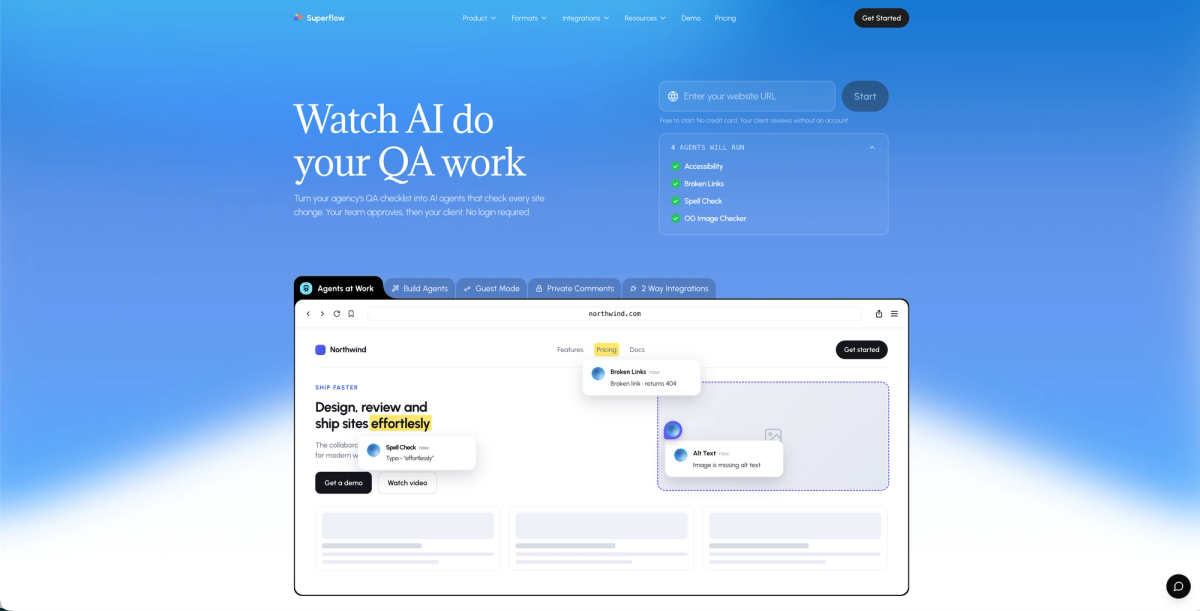
Superflow is an AI-powered QA and review/approval tool built for web and marketing agencies. AI agents convert any QA checklist (or an uploaded brand guide) into automated checks that run on every site change across desktop and mobile, posting findings as pinned comments on the exact element that triggered them. Your team reviews what the agents flagged, fixes what needs fixing, and then your client signs off.
That sign-off happens from a direct link. No account required, no app to install. That low barrier matters when you're chasing approval from a stakeholder who won't create yet another login.
Superflow also captures technical context automatically, including browser, OS, and screen resolution, alongside every comment, so nothing gets lost between the AI's first pass and the final sign-off.
If that workflow matches what your agency needs, try Superflow free and run your first AI QA pass today.
AI & Automated QA
Superflow's AI review agents convert any QA checklist or uploaded brand guide into named agents that run automatically on every site change, across desktop and mobile. Built-in agents cover Accessibility, Broken Links, Spell Check, and OG Image checks. You can build custom agents for any checklist item via a prompt-and-test interface. Findings post as pinned comments on the exact element, so your team sees only what needs a decision, not a blank checklist to work through manually. Superflow's Memory layer makes agents smarter over time. Upload brand guides and checklists once per client; Memory learns additional rules and past decisions from every review, so by project ten the agents already know what project one had to learn.
Userback's AI layer, on the other hand, now covers more than tagging. It auto-categorizes incoming feedback, surfaces patterns and recurring themes across your feedback base, detects sentiment, and groups similar issues together. That is genuinely useful for product teams handling high volumes of user-reported bugs. What it does not do is run automated checks on your site, no agents scanning for broken links, accessibility issues, or brand compliance before a client sees the work.
If your workflow starts with a UAT and QA testing pass before client review, Superflow covers that step without separate tooling, and gets more accurate on each project.
Client Review & Approval Workflow
Superflow's approval workflow runs in two stages. First, your team reviews what the AI agents flagged and resolves issues. Then clients get a direct link: they click anywhere on the live page, leave a comment or click approve, and that sign-off is logged with a full audit trail. No account, no app, no setup on their end.
That matters more than it sounds. Every extra step between "send for review" and "client opens it" is a place where approval stalls. Removing the login requirement isn't a nice-to-have; it's the difference between a two-day feedback round and a two-week one. Superflow's audit trail logs every comment, finding, and approval, so there's a clear record of what was reviewed, who approved it, and when. That record matters when a client circles back three months later.
Userback, though, offers a feedback widget with annotation capabilities, but client access typically requires more project configuration, which adds friction for reviewers who just need to leave a quick note or approve a deliverable.
Asset Type Support & Collaboration
Both Superflow and Userback support feedback on websites and web apps, but their asset coverage diverges noticeably beyond that. Modern review workflows increasingly need to handle more than just URLs, and that gap shows up clearly here.
Superflow supports websites, PDF review, video, images, and Lottie files under one roof. Userback covers websites and accepts image and video uploads, though its PDF support is more limited and it does not support Lottie files.
Where the Difference Shows Up in Practice
For agencies juggling multiple deliverable types per client, the asset gap matters. A single project might include a live staging site, a PDF brand guide, and static design mockups. Superflow lets your team collect pinned comments across all of those without switching tools or losing context between feedback threads.
- Userback's video feedback feature is genuinely useful for capturing walkthroughs, but it skews toward bug reporting over collaborative creative review.
- Superflow's multi-asset support keeps feedback organized by project, not by file type, so nothing gets buried in a separate thread or email chain.
If your team works primarily on web builds, either tool covers the basics. If you're managing mixed-media projects, Superflow's asset range gives you more room to work.
Integrations & Setup
Superflow connects to the tools your team already uses. It integrates with Slack, Jira, Asana, Trello, ClickUp, and Monday.com, with two-way sync: comments create tasks, sign-offs close them, and statuses stay in sync both ways. Slack notifications let you reply in-thread and act without switching tabs. And the best part? Setup is a one-click install for Webflow, WordPress, Framer, and Shopify, or a single script tag for any other site. No dev sprint, no plugin sprawl. AI agents are live the moment the snippet is in.
Userback also has a wide integration list, Slack, Jira, ClickUp, GitHub, GitLab, Azure DevOps, Linear, Asana, Monday.com, Notion, Trello, Zapier, and more. Two-way sync is available for Jira, Linear, and ClickUp. Setup involves embedding a widget or JavaScript snippet into your app or site, with additional steps to connect project management tools and configure notification routing. Some users report a steeper learning curve before the tool feels natural to use.
Pricing Comparison
Superflow has a free Starter plan, with paid tiers starting at $24/seat/month on annual billing (or $29/seat/month monthly). Guest seats are always free and unlimited, so clients reviewing and approving work never count against your seat total. Userback's paid plans start at $29/month, though feature access scales quickly with price.
The real difference shows up in what you get per seat. Superflow's Growth plan includes AI agent reviews, automated QA runs, client approval links, and integrations with Slack and major task managers. Userback charges more to unlock comparable collaboration depth.
For agencies managing multiple client projects, Superflow's seat-based pricing stays predictable as your project volume grows, and its ClickUp integration keeps tasks in sync automatically. AI review credits are usage-based and roll over monthly, so you're not paying for capacity you don't use.
Superflow vs Userback: Quick Comparison
| Feature | Superflow | Userback |
|---|---|---|
| In-context website feedback | Yes | Yes |
| AI agents running QA checklists automatically | Yes | No |
| Client approval (no login required) | Yes | Limited |
| Built-in approval workflow with audit trail | Yes | No |
| Video feedback | Yes | Yes |
| PDF, image & Lottie file review | Yes | Limited |
| White-label client portal | Yes | No |
| Memory (learns client rules over time) | Yes | No |
| Free guest seats (unlimited) | Yes | No |
Both tools cover the core feedback loop well. Where they split is in how far each one extends beyond that loop. Superflow skews toward agencies managing client relationships directly in the browser, with white-label client portal options and no-login review links built in from the start. Userback leans more toward internal product and dev teams tracking bugs and user feedback at scale.
Why Superflow Is the Better Choice
Superflow was built for web agencies that need QA and client approval to happen fast without manual effort. While Userback handles the basics of visual feedback well, Superflow covers the full cycle from automated QA to final sign-off.
- AI agents run your QA checklist on every site change and post findings as pinned comments, so your team starts review with the first pass already done.
- Client access requires no login or app install, removing the friction that turns two-day approvals into two-week delays.
- Memory learns each client's brand rules and past decisions, so agents get more accurate on every project, without extra setup.
- Superflow integrates natively with Jira, Asana, ClickUp, and Slack, with two-way sync so sign-offs automatically close the corresponding task.
The result is fewer QA rounds, faster client sign-offs, and a system that gets better with every project you run through it.
Try Superflow free and see how much of your QA workload the agents pick up on the first run.
Final Thoughts on Superflow vs Userback
Userback is a solid pick for dev and QA teams managing internal bug reporting at volume. Superflow is built for agencies that need the full cycle covered: AI running QA automatically, your team reviewing findings, and clients approving from a link without creating an account. Your workflow will tell you which one fits.
FAQ
Should my agency use Superflow or Userback for client review cycles?
If your team manages web builds and needs AI to run QA automatically before clients approve live work, Superflow is the stronger fit. Userback is built for internal product and QA teams tracking bugs at scale, so the tool works best when your reviewers are developers and testers, not external clients.
How does Superflow's AI layer differ from Userback's feedback tools?
Superflow converts any QA checklist into named AI agents that run automatically on every site change, posting findings as pinned comments on the exact element. Built-in agents cover Accessibility, Broken Links, Spell Check, and OG Images; you can build custom agents for any checklist item. Memory makes agents smarter with every project by learning each client's rules and past decisions. Userback offers AI-assisted tagging to sort incoming feedback, but does not scan your site automatically, so your team still runs the first pass manually.
Who is Userback best suited for, and where does Superflow serve agencies better?
Userback fits product managers and developers who need structured bug capture from end users during testing cycles, with session replays and metadata baked in. Superflow is built for agencies delivering client work, where the priority is collecting feedback on live staging URLs, getting sign-offs without login friction, and keeping comments organized across mixed-media projects.
Can clients leave feedback in Superflow without creating an account?
Yes. Clients click a link, click anywhere on the live page, and leave a comment with no login or app install required. Userback uses an embedded widget for feedback collection, and external reporters can submit through it without creating an account. The more meaningful gap is that Userback has no dedicated approval workflow or sign-off link, there is no equivalent of sending a client a link to formally approve a deliverable. Sign-off typically happens outside the tool, over email or a separate channel, which adds steps and slows down the handoff.
What should I consider before switching from Userback to Superflow?
If your current workflow depends on session replays or mobile app bug reporting, Userback covers those use cases and Superflow does not. Superflow is the right move if your bottleneck is client approval speed, mixed-asset review across websites, PDFs, video, images, and Lottie files, or running AI-powered QA checks automatically on every deploy without adding separate tooling to your stack.
How does Superflow's pricing compare to Userback's?
Superflow has a free Starter plan and paid plans starting at $24/seat/month (annual) or $29/seat/month (monthly). Guest seats are always free and unlimited, so clients reviewing and approving work never count against your seat total. Userback's paid plans start at $29/month, with feature access scaling steeply at higher tiers. For agencies managing multiple client projects, Superflow's unlimited free guest seats keep costs predictable as your client roster grows.
Which website builders and CMS platforms does Superflow support?
Superflow installs in one click on Webflow, WordPress, Framer, Shopify, Wix, Bubble, Drupal, Elementor, Squarespace, HubSpot, and Google Tag Manager. For any other site, a single script tag handles installation. AI agents go live the moment the snippet is in place, with no extra configuration needed to start running QA checks. Userback also uses a JavaScript snippet for installation with comparable CMS coverage for web apps.
Is Superflow SOC 2 or HIPAA compliant?
Yes. Superflow is SOC 2 Type II certified and HIPAA-compliant, with a BAA available. It also supports data residency, end-to-end encryption, SAML/SSO and SCIM (both on Enterprise), and keeps a full audit trail of every comment, finding, and approval. For agencies working with clients in healthcare, legal, or financial services, those compliance credentials remove a common procurement blocker that comes up before sign-off.