> ## Documentation Index
> Fetch the complete documentation index at: https://usesuperflow.ai/docs/llms.txt
> Use this file to discover all available pages before exploring further.
# How to view the project dashboard
## How to View the Project Dashboard
In this article, you will learn how to access the Project Dashboard through the Superflow Toolbar. The Project Dashboard requires admin-level credentials as this page enables you to manage projects.
1. Find the **Superflow Toolbar** and click the **More Options** icon.
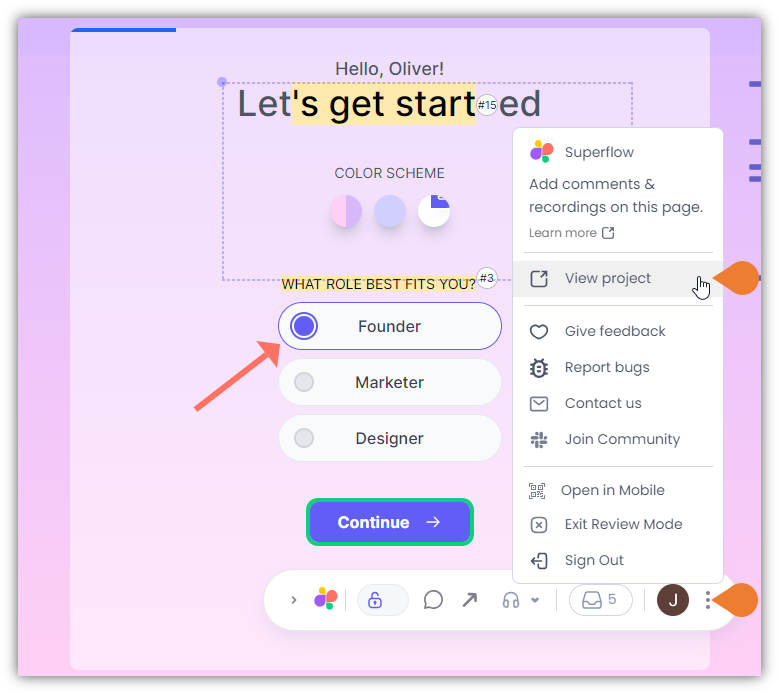 2. A sub-menu will expand, click the **View Project** option to select.
3. A new tab will direct you to the **Project Dashboard** page.
2. A sub-menu will expand, click the **View Project** option to select.
3. A new tab will direct you to the **Project Dashboard** page.
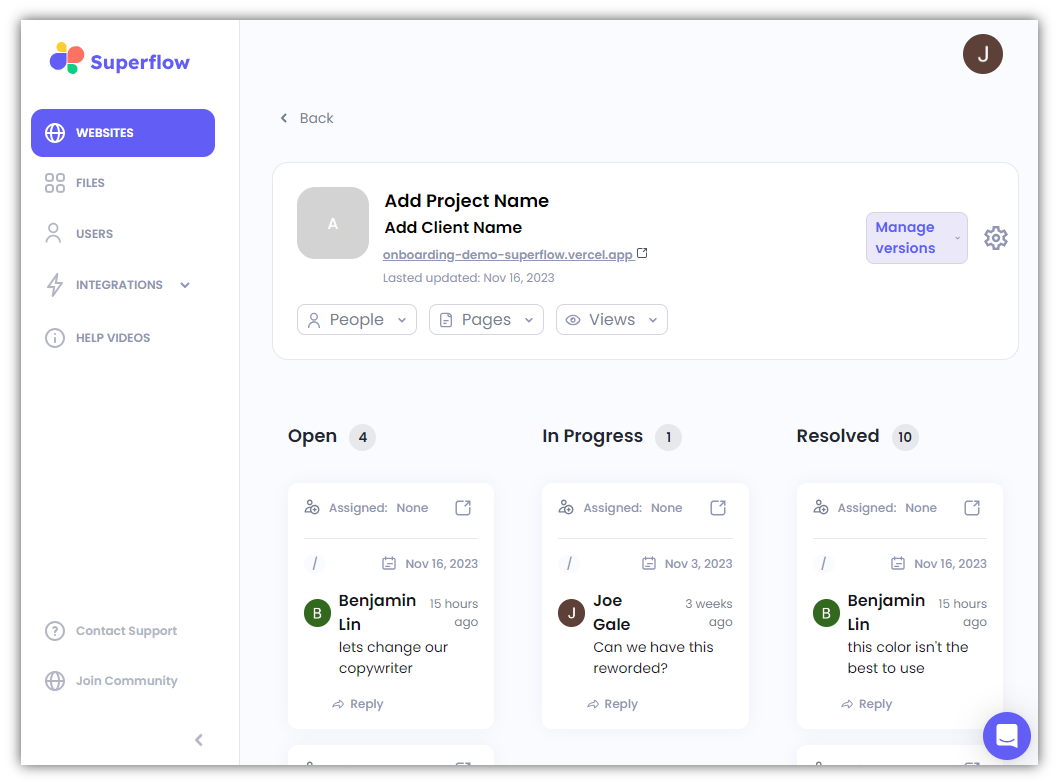 4. On this page, you will find the following features:
* Project Details (e.g. project URL, People, Pages, Views)
* Manage Versions
* Settings
* Dashboard for Comment Status (e.g. Open, In Progress, Resolved)
5. You can also access the following modules:
* Website
* Files
* Users
* Integrations
* Help Videos
* Contact Support
* Join Community
## Related topics
- [How to view all comments on a project](/docs/dashboard/how-to-view-all-comments-on-a-project.md)
- [How to access project settings](/docs/dashboard/how-to-access-project-settings.md)
- [How create a new project](/docs/dashboard/how-create-a-new-project.md)
- [How to remove commenters](/docs/dashboard/how-to-remove-commenters.md)
- [How to invite users to your project](/docs/dashboard/how-to-invite-users-to-your-project.md)
4. On this page, you will find the following features:
* Project Details (e.g. project URL, People, Pages, Views)
* Manage Versions
* Settings
* Dashboard for Comment Status (e.g. Open, In Progress, Resolved)
5. You can also access the following modules:
* Website
* Files
* Users
* Integrations
* Help Videos
* Contact Support
* Join Community
## Related topics
- [How to view all comments on a project](/docs/dashboard/how-to-view-all-comments-on-a-project.md)
- [How to access project settings](/docs/dashboard/how-to-access-project-settings.md)
- [How create a new project](/docs/dashboard/how-create-a-new-project.md)
- [How to remove commenters](/docs/dashboard/how-to-remove-commenters.md)
- [How to invite users to your project](/docs/dashboard/how-to-invite-users-to-your-project.md)