> ## Documentation Index
> Fetch the complete documentation index at: https://usesuperflow.ai/docs/llms.txt
> Use this file to discover all available pages before exploring further.
# How to enter the review mode
## How to Enter the Review Mode
In this article, you will learn how to enter the Review Mode and enable the Superflow Toolbar.
1. Open a **Browser** and go to the page you want to review.
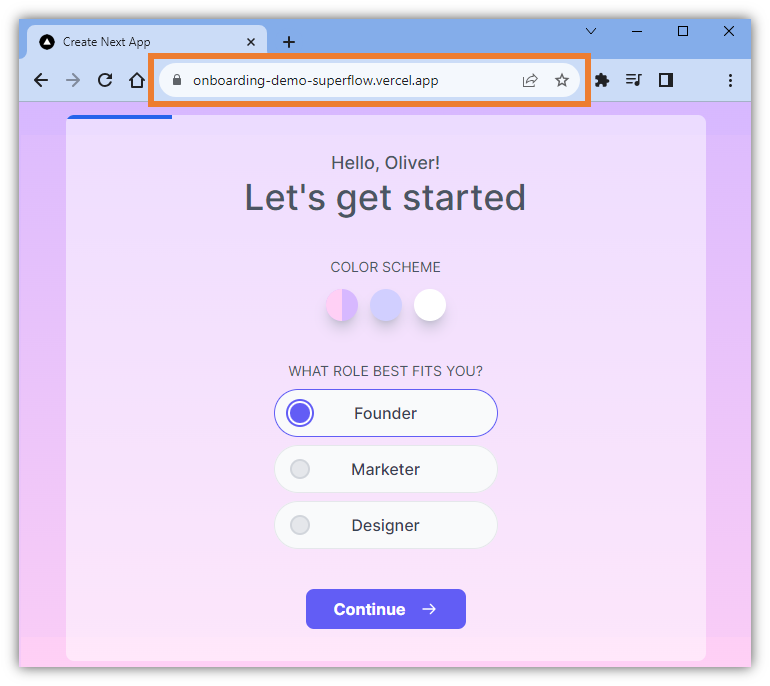 2. In the **Address Bar**, edit the address by adding this value at the end of the URL: **?review=true**.
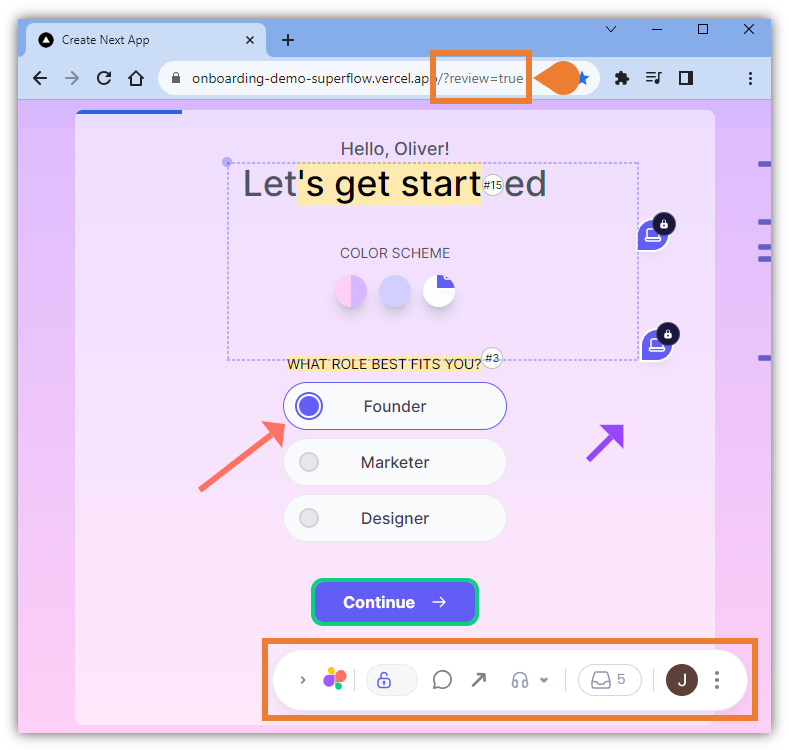 3. Press **Enter** on your keyboard to enable the **Review Mode**.
4. You will enter the **Review Mode** and the **Superflow Toolbar** will be enabled.
## Related topics
- [How to enter exit comment mode](/docs/how-to-guides/how-to-enter-exit-comment-mode.md)
- [How to exit the review mode](/docs/how-to-guides/how-to-exit-the-review-mode.md)
- [How to draw a box comment on the page](/docs/how-to-guides/how-to-draw-a-box-comment-on-the-page.md)
- [How to integrate with slack](/docs/Integrations/how-to-integrate-with-slack.md)
- [How to invite commenters](/docs/dashboard/how-to-invite-commenters.md)
3. Press **Enter** on your keyboard to enable the **Review Mode**.
4. You will enter the **Review Mode** and the **Superflow Toolbar** will be enabled.
## Related topics
- [How to enter exit comment mode](/docs/how-to-guides/how-to-enter-exit-comment-mode.md)
- [How to exit the review mode](/docs/how-to-guides/how-to-exit-the-review-mode.md)
- [How to draw a box comment on the page](/docs/how-to-guides/how-to-draw-a-box-comment-on-the-page.md)
- [How to integrate with slack](/docs/Integrations/how-to-integrate-with-slack.md)
- [How to invite commenters](/docs/dashboard/how-to-invite-commenters.md)