> ## Documentation Index
> Fetch the complete documentation index at: https://usesuperflow.ai/docs/llms.txt
> Use this file to discover all available pages before exploring further.
# How to delete comments
## How to Delete Comments
In this article, you will learn how to delete existing comments.
1. On the screen, find and click the **Comment** you want to delete.
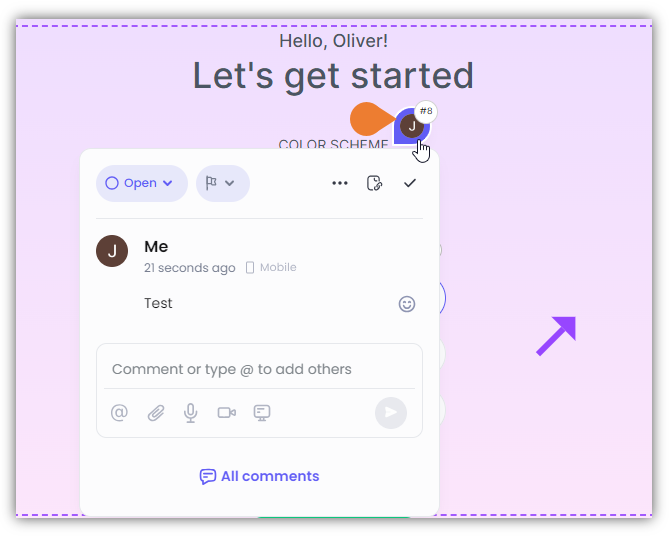 2. The **Comment Box** will appear, click the **Menu** (...) to enable more options.
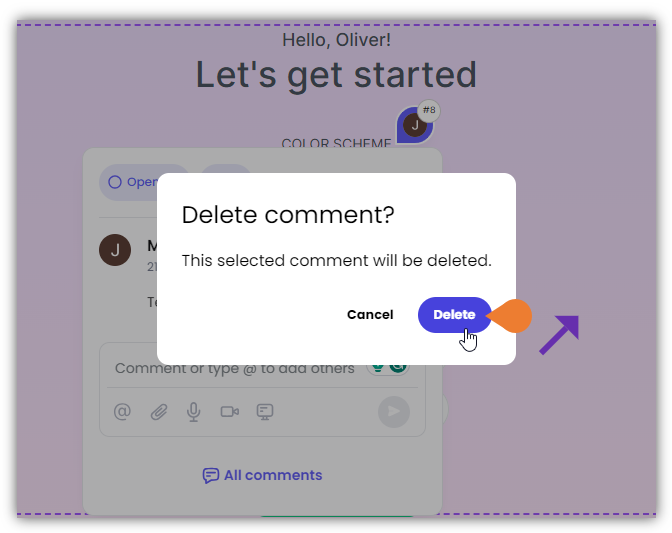
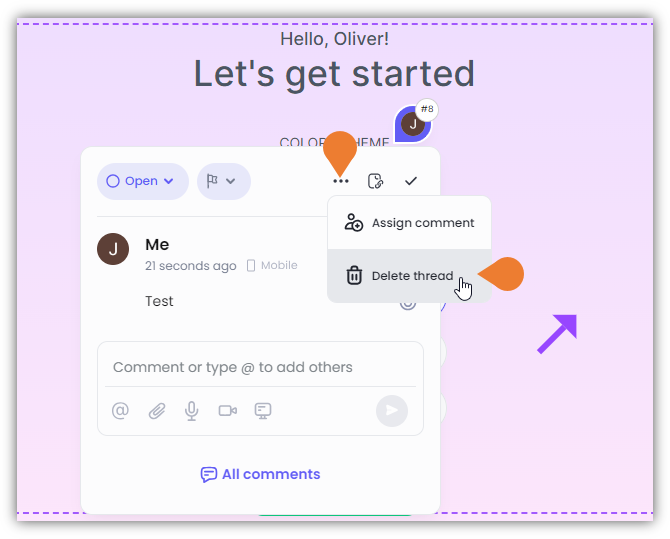 3. Click **Delete Thread**. A **Confirmation** dialog box will appear. Click **Delete** to continue deleting the comment.
 ## Related topics
- [How to remove commenters](/docs/dashboard/how-to-remove-commenters.md)
- [How to remove admin users](/docs/dashboard/how-to-remove-admin-users.md)
- [How to search comments](/docs/how-to-guides/how-to-search-comments.md)
- [How to open the comments sidebar](/docs/how-to-guides/how-to-open-the-comments-sidebar.md)
- [How to add a comment to a text](/docs/how-to-guides/how-to-add-a-comment-to-a-text.md)
## Related topics
- [How to remove commenters](/docs/dashboard/how-to-remove-commenters.md)
- [How to remove admin users](/docs/dashboard/how-to-remove-admin-users.md)
- [How to search comments](/docs/how-to-guides/how-to-search-comments.md)
- [How to open the comments sidebar](/docs/how-to-guides/how-to-open-the-comments-sidebar.md)
- [How to add a comment to a text](/docs/how-to-guides/how-to-add-a-comment-to-a-text.md)